HexWin
Local voice dictation for Windows
Hold the hotkey, speak, release. The text lands at your cursor — in any application, without ever leaving your machine.
right Shift → speak → release
Hex, but for Windows
Hex is a hold-to-talk dictation app for macOS, and a good one. It has never run on Windows, and the question comes up often enough that this exists to answer it: HexWin is an independent Windows application built on the same idea and the same engine — hold a key, speak, release, the text lands at your cursor, and nothing leaves the machine.
It is not a port. The macOS original is Swift on CoreAudio; this is C# on .NET 9, WASAPI and a Win32 keyboard hook, written from scratch for the platform. What the two share is the shape of the thing and NVIDIA Parakeet TDT v3 underneath.
If you landed here looking for a Windows alternative to Hex, Wispr Flow, SuperWhisper or Windows Speech Recognition: this is free, open source under Apache 2.0, runs offline on CPU, and asks for no account.
It answers before you finish thinking
Measured on a Dell Pro Max 16 (Core Ultra 7 255H), on CPU — no graphics card involved.
| Speech length | Wait after release |
|---|---|
| 0.6 s | 0.05 s |
| 1.6 s | 0.08 s |
| 5 s | 0.19 s |
| 40 s | 1.58 s |
A one-sentence dictation — the normal case — is inserted faster than you can move your hand back to the keyboard.
Why it is fast: Parakeet, not Whisper
Whisper was tried first, and dropped after measurement. It is an autoregressive encoder-decoder, so it pays a fixed cost of about 1.4 s per transcription however short the audio is. On a single sentence, that cost is paid in full.
Parakeet TDT v3 is a transducer and has no such bottleneck. Same recordings, Parakeet on CPU against Whisper on GPU, five-second clip: 2.29 s → 0.19 s.
It is the same engine Hex uses on macOS, and it recognises the spoken language on its own among 25 European languages — the language you dictate in is never a setting to get wrong.
A long dictation does not wait for the release
By default the text arrives when you let go of the key. For long dictations, turn on sentence by sentence in the settings: each pause in your speech closes a piece, which is transcribed and inserted while you keep talking.
The pause that counts is 700 ms, adjustable from 100 ms to 5 s. A dictation cancelled halfway keeps the sentences already inserted.
The pause is read on the sound level. In a noisy room none is seen, and the text simply arrives at release, as it would with the option off.
Nothing leaves your machine
- No cloud, no account, no API key. Once the model is downloaded, HexWin needs no network connection at all.
- Your audio never touches the disk. The recording lives in memory and is gone the moment the transcription ends — there is no file to find, and nothing to clean up.
- Dictations stay out of clipboard history. The text is handed over as a private transfer, so it never resurfaces in ⊞ Win + V, and whatever you had copied before is put back afterwards.
- The keyboard hook watches for one chord and nothing else. It stores no keystrokes. The code is short and meant to be read: KeyboardHook.cs.
Two commands to start
Download the archive from the latest release, unzip it, then in PowerShell:
.\get-model.ps1     # about 480 MB, once
.\HexWin.exe
Nothing else to install — not even .NET, which is bundled inside the executable. A tray icon shows the state: grey while the model loads, blue when ready, red while recording, orange while transcribing.
There is no installer either. On the first start, HexWin asks once whether to put a shortcut on the desktop: it starts HexWin, or opens its settings when HexWin is already running.
You can tell it is listening without looking away
The tray is the wrong place to look while you are watching your own text appear. So a circle sits at the top of the screen for as long as the application is busy — red while recording, orange while transcribing, nothing at rest — and a short tone marks each end of the recording.
It is the same signal as the tray icon, put where the eye already is. The circle is click-through and never takes the focus, so it cannot become the window a dictation was aimed at. An orange circle also answers a question nothing used to: a hotkey pressed while a transcription is still running is refused by design, and now you can see why.
Either cue can be turned off on its own, from the tray menu or the settings
window, with no restart. The choice is written back to feedback in
settings.json. The circle’s colour, size, opacity and position
are settings too.
Settings, without opening a file
Double-click the tray icon, or right-click it and pick the first entry, or launch HexWin again while it runs: the settings window opens, in four pages — dictation, cues, engine, general. It follows the Windows light or dark theme, and takes the Windows 11 frame where the system offers it.
- The hotkey is captured, not typed. Hold the keys you want, release. The window names the side of each key, and warns when a single key costs you something for typing.
- Saving rewrites only what changed, so the comments in
settings.jsonsurvive. A setting missing from an older file is added. - What can change on the fly does. The hotkey, the insertion mode, sentence by sentence, the circle and the tone apply on the next dictation. The engine, the recording durations and the log wait for a restart, and the window says so.
- French or English, following Windows unless told otherwise. That is the language of HexWin’s own windows and menus; the language you dictate in is still Parakeet’s to work out.
What to expect, stated up front
- SmartScreen will warn you once. The executable is not code-signed, so Windows shows “Windows protected your PC”. Click More info → Run anyway. A signing certificate costs several hundred euros a year; this project does not have one.
- Some antivirus products flag it, because a global keyboard hook is a pattern they watch for. That hook is exactly what makes push-to-talk work from any window.
- It cannot type into elevated windows unless it is elevated too. That is Windows UIPI isolation doing its job, not a bug.
- The right Shift stops being a Shift while HexWin runs: it is the hotkey, and the hook keeps it. The left one still types capitals, and the settings window can move the hotkey elsewhere.
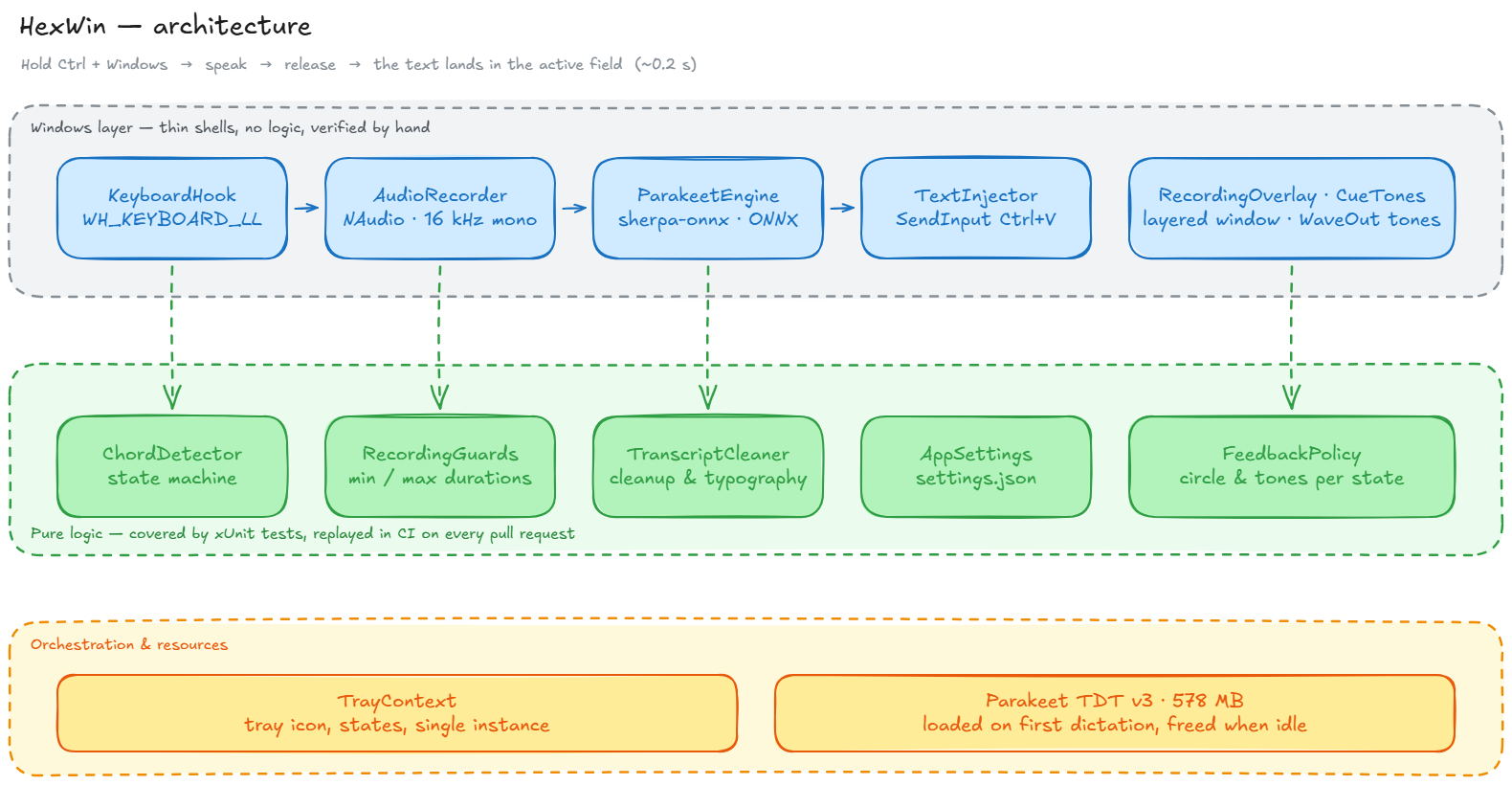
How it is built
Two layers, kept apart on purpose. The Win32 shells — keyboard hook, audio capture, engine, text injection — wire up system APIs and decide nothing. Every decision lives in a pure layer tested without Windows: chord detection, keyboard auto-repeat, keys released out of order, a key left stuck after a session lock, a second dictation triggered while one is still running.